See how the whole job connects — one subject at a time.
Six stages carry a job from its starting point to the paid invoice. Two more run through every one of them. Pick what you came for, or start at the beginning.
Let new work arrive the way clients already send it.
A branded “Send us your files” page you link from your own website. Anyone can send files and a note — no account needed.
- Your page, your brand
Your studio’s name, logo and colors. Put the link on your website, in your email signature — anywhere a client or a prospect might find it.
- Built for big files
You set the per-file and per-submission limits. The sender needs no account: just their name, company and a note about the job.
- You decide where it goes
Submissions land in Intake with a badge and an email. Nothing is filed for you — assign the files to a project, start a new project from them, move them to the client’s files, or add them to an opportunity, where they help you prepare the quote (never shown on it) and become the project’s Supporting Files if it’s accepted.
Quote the job the way you’ll run it.
When a job needs a price agreed first, Opportunities holds your quotes on one board — and your client accepts from a link, by typing their name and confirming.
- Built from the real scope
The same deliverables, tasks and prices the project will use. Start from a template when the job is a familiar one.
- Margin before you send
In the quote’s Financials view, cost estimates sit beside each price, so your billing team sees estimated profit and margin. Your client never sees them.
- Every quote keeps its history
Sent, viewed, comments and acceptance — on the quote itself.
Every job gets one home.
A project holds the deliverables, tasks, files and conversation for one job — and its due dates feed your calendar. However the job began, this is where it’s run.
Blank, from one of your templates, or in the Project Builder. No quote or intake needed.
Convert to Project shows what will come across — deliverables and prices, tasks, scope, payment terms and budgeted costs — for you to review first. Nothing is invoiced.
About quoting →Start a new project from an intake submission, or assign it to one you already have. Files from Intake come across as the project’s Supporting Files.
About intake →- Brand guidelines$6,500
- Lobby photography$4,200
- Launch film (60s)$6,200
- Room signage$1,500
What lives on a project
No more final_FINAL_v3.
Every deliverable keeps its whole version history — who uploaded each one, when it was sent, and what the client decided.
- Versions stack, in order
Each new version stacks onto the deliverable with its own record of when it was sent and what the client said.
- Unsent means unseen
Your client never sees a new version until you send it — they keep the version they were sent.
- Decisions tied to versions
Every decision is tied to the exact version it was made on — no guessing which file was approved.
Feedback on the work — not in an email about the work.
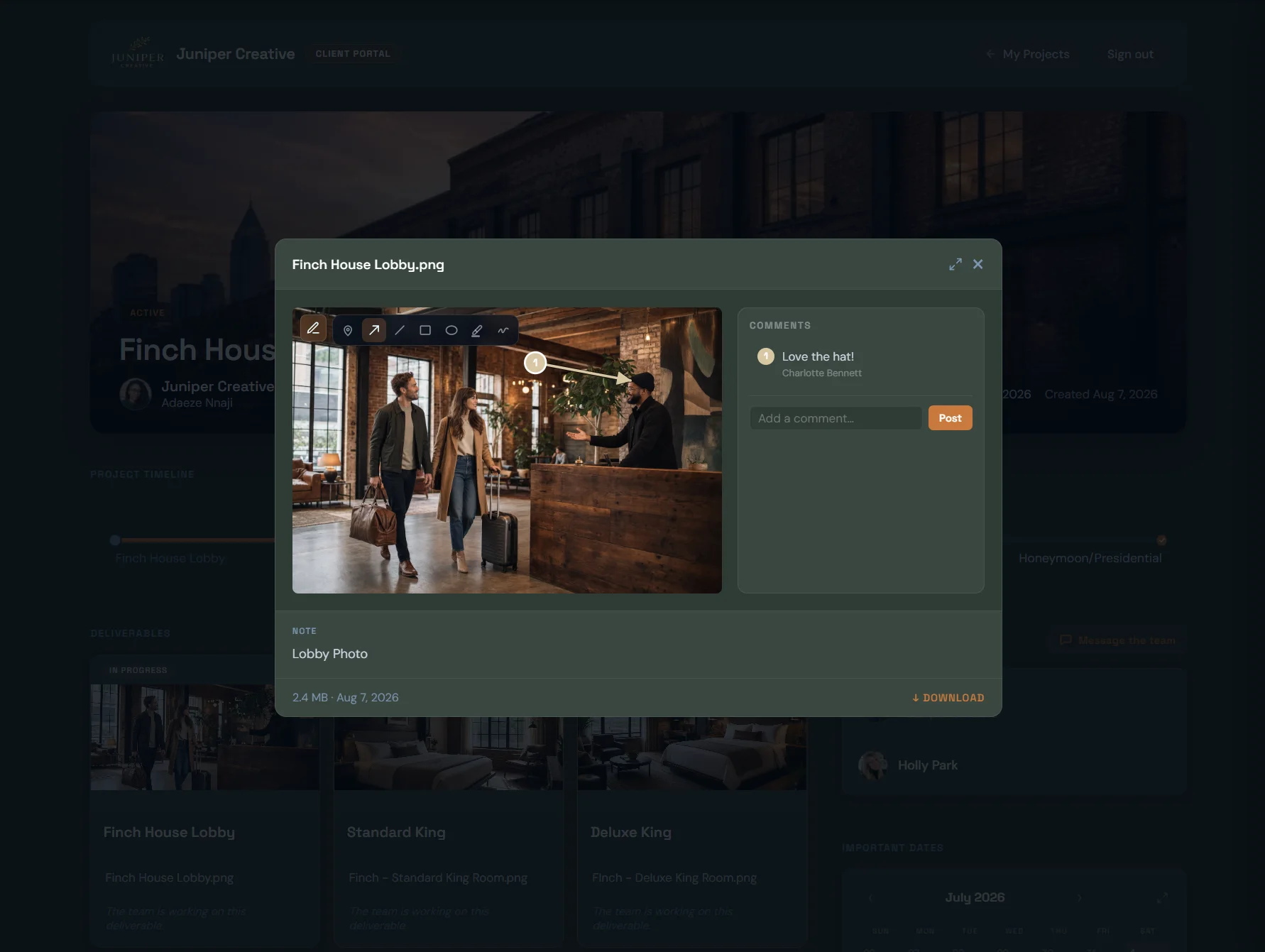
Clients mark up the actual work — the exact spot on the page, the exact moment in the video — then approve it or ask for changes. If they haven’t opened it, Projunity follows up for you.
- Mark it up
Pins, arrows, boxes and highlights on images, PDF pages and paused video frames — video comments pinned to the second.
- One clear decision
“Approve” or “Request Changes” on the version under review. Approval is always a person’s decision, never automatic.
- On the record
Who approved which version, and when — and you’re told straight away.
- Stop chasing
Projunity reminds clients every 48 hours until they’ve opened the work or made their decision, for up to 30 days. They can download the version they’re looking at.
From approved work to paid invoice.
Pull the project’s work onto an invoice, send it, and see the moment it’s paid — right on the project.
The money path
- Pick the work
Choose it from Project Billing, or add your own lines.
- Deposit or progress billing, when it fits
Request a deposit, or invoice the work in stages.
- Send the invoice
Payment reminders go out on a schedule — or pause them per invoice.
- Your client pays by card
From the invoice link — no sign-in needed — once your studio has connected Stripe.
- Paid, on the project
Payment status shows right beside the work.
Across every stage
Two things run through all six.
Who does the work, and what your client sees of it, aren’t steps in the job — they’re part of every one.
The right people, with exactly the right access.
Bring in your staff and outside collaborators — each gets exactly the access you give them, and freelancers never cost you a seat.
- Seat
- Uses a seat
- Access
- Staff get roles you name, with permissions you choose — on plans with more than one seat.
- Seat
- Never a seat · unlimited
- Access
- Only the projects they’re invited to. For each one you decide whether they can manage deliverables and whether they communicate with the client.
- Seat
- Never a seat
- Access
- Your branded client space, showing only what you share. See Client Experience →



Two threads on every project
Messages stay on the project, so nothing gets lost in someone’s inbox — and the team’s conversation stays the team’s.
Your studio team and the collaborators on the project. Your client never sees it.
The conversation with your client, right beside the work. Collaborators join it only if you let them communicate with the client.
A space with your name on it — nothing to install.
Not another tool your clients have to learn: one branded space, in their browser, where they review the work, mark it up, approve it, talk to you and pay.
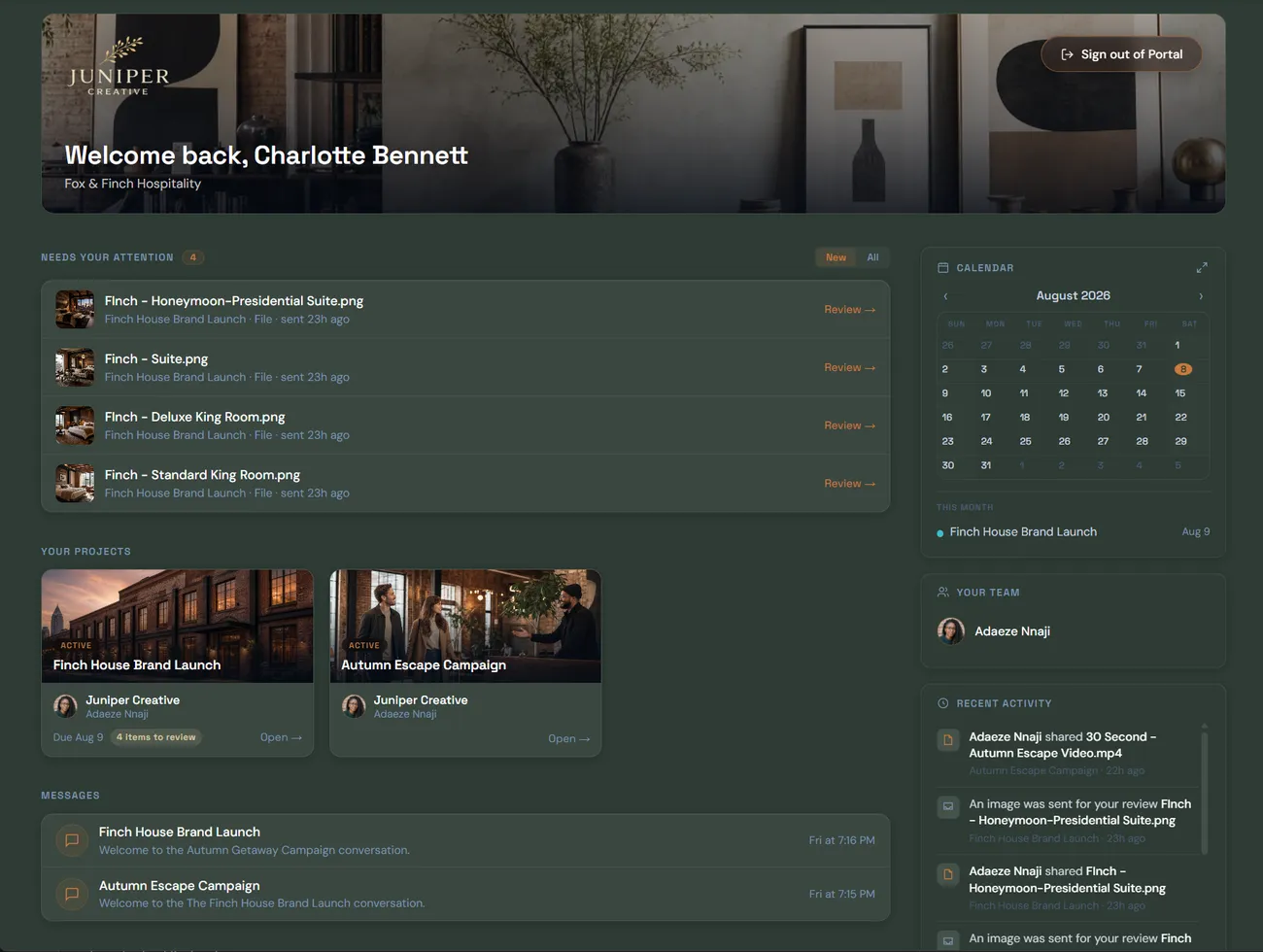
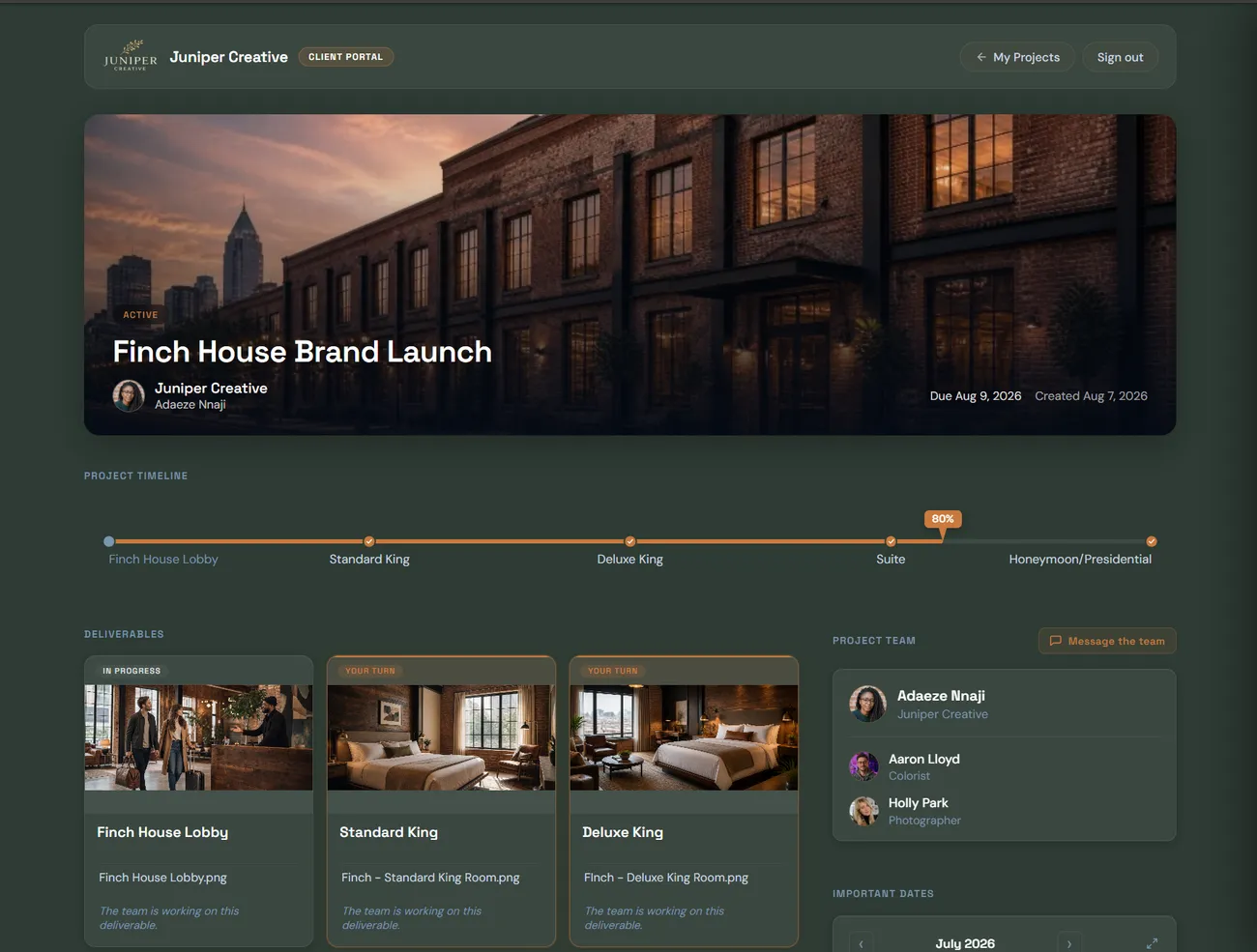
These screenshots are real — the client space for Juniper Creative, a fictional studio we use for demos.
What your clients can do
- Review the work
The version you’ve sent, and earlier ones you shared.
- Mark it up
A comment on the exact spot, or the moment in the video.
- Approve it
One clear decision, recorded against the exact version.
- Talk to you
Messages stay with the project, not lost in email.
- Pay the invoice
By card, from the invoice link — no sign-in.
The projects you show them, the deliverables and files you share, review requests, project messages and invoices.
Your team thread, internal comments, unsent versions, your costs and margins, or any sign of your other clients.
No passwords to remember: clients sign in with a link we email them, or with Google.